What is Business Automation: Optimizing Small Business Efficiency
Estimated reading time: 8 minutes
Key Takeaways
- Business automation leverages technology to perform repetitive tasks with minimal human intervention.
- Small businesses benefit through time savings, cost reduction, improved efficiency, reduced errors, and enhanced customer experience.
- Examples include expense tracking, payroll processing, customer support chatbots, marketing automation, and inventory management.
- Implementing automation involves identifying repetitive tasks, selecting suitable tools, integrating systems, and testing workflows.
- Addressing challenges like resistance to change and integration issues is crucial for successful automation.
Table of Contents
- Introduction
- What is Business Automation
- Benefits of Automation for Small Business
- How Automation Works
- Small Business Automation 101
- Business Automation Explained
- Conclusion
- Frequently Asked Questions
Introduction
What is business automation? Business automation is the use of technology to perform repetitive, manual tasks. It allows businesses to optimize workflows with minimal human intervention.
According to the ActiveCampaign Blog – Business Automation, this process is especially beneficial for small businesses, as it helps them save time, reduce costs, and improve overall efficiency.
Additionally, the Expensify Blog – Small Business Automation Guide explains that automation enables small companies to reallocate resources toward strategic, growth-oriented activities.
This article will explore how small businesses can leverage automation and the benefits it offers, as highlighted by the Acronis Blog – What is Business Automation.
Benefits of Automation for Small Businesses
- Time Savings: Tasks are completed faster, freeing up time for strategic initiatives.
- Cost Reduction: Lower operational costs by minimizing human labor for routine tasks.
- Improved Efficiency: Higher productivity as workflows are streamlined.
- Reduced Errors: Automated processes diminish the risk of human mistakes.
- Enhanced Customer Experience: Faster service and personalized interactions boost customer satisfaction.
As we delve deeper, we will explore these benefits and more in detail.
What is Business Automation
Business Automation Explained
Business automation, or business process automation (BPA), involves transforming traditional manual workflows into automated processes. This is achieved through technologies like artificial intelligence (AI), machine learning (ML), and specialized software. As outlined in Understanding Intelligent Agents in AI: Definition, Roles, and Real-World Applications, this shift enables businesses to focus on higher-value tasks while reducing human errors.
Automation replaces manual data entry, customer communications, payroll processing, and more with streamlined digital processes. This shift enables businesses to redirect their workforce to more creative and strategic tasks. Learn more at Software AG – What is Business Automation, ActiveCampaign Blog – Business Automation, and Acronis Blog – What is Business Automation.
Examples of Automated Tasks in Small Businesses
- Expense Tracking: Tools like Expensify automate receipt categorization and manage reimbursement workflows. Refer to the Expensify Blog – Small Business Automation Guide.
- Payroll Processing: Software such as Gusto automatically handles salaries, tax deductions, and compliance. See Bench Blog – Small Business Automation and Bluehost Blog – Automation for Small Business.
- Customer Support: Chatbots interact with customers instantly, enhancing service efficiency. Learn more at Understanding Intelligent Agents in AI, Bluehost Blog – Automation for Small Business, and Acronis Blog.
- Marketing: Automating email campaigns and lead nurturing reduces the need for manual follow-ups. Check out the Expensify Blog, Spark Services – 50 Automation Ideas for Small Businesses, and Multi-Agent Systems in AI.
- Inventory Management: Automated systems track stock levels and reorder supplies when needed. Visit Software AG and SitePoint – Business Automation for more information.
These examples are part of small business automation 101, laying a foundation for applying automation to common business tasks.
Benefits of Automation for Small Business
Advantages of Implementing Automation
- Time Savings: Automation frees time by replacing lengthy manual processes, offering more opportunity for strategic tasks. For instance, automating invoice processing speeds up approval times. See Expensify Blog and ActiveCampaign Blog.
- Improved Efficiency: Automating workflows leads to accomplishing more work with fewer resources. Refer to Bench Blog and Acronis Blog.
- Cost Reduction: Lower labor costs and reduced operational inefficiencies enhance profitability. Check out Bluehost Blog and Acronis Blog.
- Accuracy: Automation minimizes errors, improving data reliability and compliance. Learn more at Software AG and Bluehost Blog.
- Enhanced Customer Experience: Expedient responses and efficient operations promote customer loyalty. See ActiveCampaign Blog and U.S. Chamber of Commerce.
Benefits of automation for small business are numerous, offering transformative potential for operations.
How Automation Works
Setting Up and Using Automation Tools
- Identify Repetitive Tasks: Map out tasks that demand time, such as bookkeeping or scheduling.
- Select Suitable Tools: CRM systems like Zoho or workflow tools like Zapier help integrate automation. Refer to Bench Blog, Upwork, and Multi-Agent Systems in AI.
- Integrate Systems: Ensure automation software integrates with existing platforms for seamless data transfer.
- Test the Workflow: Pilot automatic processes to identify issues and refine functionality. See Upwork and the U.S. Chamber of Commerce.
Tips for Effective Integration
- Begin with Simple Tools: Use basic services like email autoresponders and gradually expand.
- Train Employees: Equip staff members with the knowledge to operate automation systems effectively.
- Evaluate Performance Regularly: Continuously assess system performance for improvements. Refer to Bluehost Blog and SitePoint.
Understanding how automation works is crucial to leveraging technology effectively in business processes.
Small Business Automation 101
A Beginner’s Guide to Automation
- Start Small: Focus on automating a single aspect like email marketing or accounting to manage complexity.
- Leverage Affordable Solutions: Many tools like MileIQ and Stamps.com offer budget-friendly options. See Bench Blog and Spark Services.
- Measure ROI: Keep track of time and cost savings to justify the investment in automation. Refer to Acronis Blog and SitePoint.
-
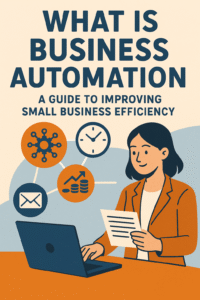
A Guide to Improving Small Business Efficiency
Common Challenges and Solutions
- Challenge: Resistance to Change
Solution: Communicate the benefits and train employees for smooth adoption. - Challenge: Integration Issues
Solution: Employ versatile tools like Zapier for seamless connectivity. See Upwork and Multi-Agent Systems in AI. - Challenge: Upfront Costs
Solution: Opt for free or low-cost software initially, scaling investments gradually. Refer to Bluehost Blog and SitePoint.
Understanding the basics of small business automation eases the transition into automated workflows.
Business Automation Explained
To summarize, business automation involves employing technology to perform repetitive tasks more efficiently. This not only saves time and money but also enhances productivity and reduces errors. For small businesses, automating workflows can significantly improve customer service and competitiveness in today’s market. Learn more at Expensify Blog, Software AG, and Acronis Blog.
Conclusion
Implementing automation can revolutionize small business operations by streamlining processes, reducing costs, and enhancing efficiency. It not only helps level the playing field with larger competitors but also frees resources for innovation and strategic growth. Explore available guides and tools to start your automation journey today. Visit SitePoint, Upwork, and Multi-Agent Systems: Redefining AI Problem Solving and Business Integration.
By understanding what business automation entails and the immense benefits it offers, small businesses can begin integrating these powerful tools into their everyday operations for lasting growth and success.
Frequently Asked Questions
Q: What is business automation?
A: Business automation is the use of technology to perform repetitive tasks with minimal human intervention, improving efficiency and reducing errors.
Q: How can small businesses benefit from automation?
A: Small businesses can save time and money, increase productivity, reduce errors, and enhance customer satisfaction through automation.
Q: What are some examples of automation tools?
A: Examples include CRM systems like Zoho, workflow automation tools like Zapier, and specialized software for tasks like payroll and marketing.
Q: Is automation expensive to implement?
A: Initial costs can vary, but many affordable or even free tools are available. Starting small and scaling gradually can manage expenses.
Q: How do I overcome resistance to automation in my team?
A: Communicate the benefits clearly, provide training, and involve employees in the transition process to ease adoption.